Access setup for ERPx
Unit4 Advanced Virtual Agent (Ava) requires that users have access to a set of APIs and objects exposed on the customer's Unit4 ERPx installation. This topic gives an overview of the general access setup required for Ava, and each functionality's dedicated page lists the specific access that must be configured for the required public APIs and objects, and a description of the required access configuration for that functionality.
Public web APIs
Ava requires access to public web APIs exposed on the customer's Unit4 ERPx installation. Public API access is configured in the Public API access (XAG005) window in Unit4 ERPx.
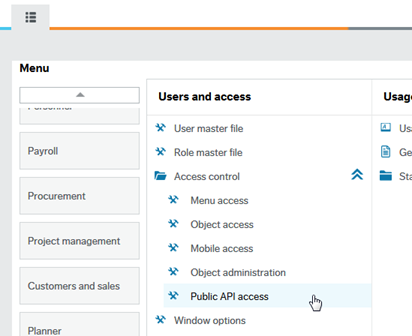
The functionality-specific implementation guides specify which endpoints users need access to.
Object Access
Setting up object access is done in Unit4 ERPx and consists of two steps for a user.
- The user must be granted access to the Objects public API in the Public API access (XAG005) window.
- The user must be granted access to the specific objects required by Ava. Object access is configured in the Object access (XAG002) window.
The functionality-specific implementation guides specify which objects users need access to.
Access to attributes and attribute values
Setting up access to attributes and attribute values follows the same process as for other objects. The users must be granted access to the Objects public API and have access to the Attributes and Attributes values objects.