Technical setup for Ava notifications
Ava notifications and proactive conversations require the customer's Unit4 ERP installation to use the Unit4 ERP Message Hub Adapter.
The Message Hub Adapter publishes messages to a centrally configured Unit4 Message Hub in the Unit4 Cloud. The Message Hub instance relays the relevant messages to Ava.
ℹ️ Note: For a detailed description of the required Message Hub setup, see the Message Hub Adapter Reference Manual.
Connect the adapter to a Unit4 Message Hub instance
Complete the following steps to connect the Unit4 ERP installation to the Message Hub infrastructure.
- Ask the Unit4 Cloud organisation to assign a Unit4 Message Hub instance to the customer tenant.
- Connect the Unit4 ERP instance to the assigned Unit4 Message Hub instance.
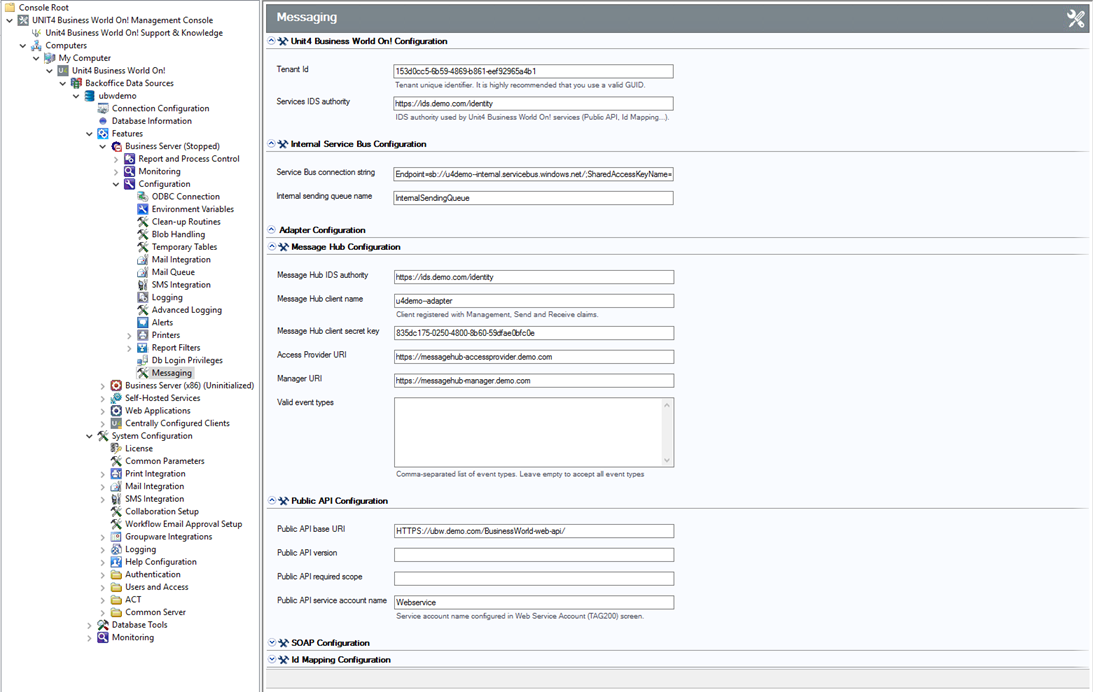
- Open the Management Console for the Unit4 ERP installation and configure the Message Hub Adapter.
- Provide the following configuration details:
- The URL of the Access Provider and Manager microservices and the IDS used by the Message Hub.
- The IDS client name and secret used to create a Message Hub sender and receiver for the adapter.
- Register the client as a Message Hub client in the Portal.
For detailed instructions, see the Message Hub Adapter Reference Manual.
Setup service account
Complete the following steps to configure the service account for the Unit4 Message Hub adapter.
- Define the service account in the Web service accounts (TAG200) window.
- In the Message Hub configuration section of the Management Console, associate the service account with the adapter.
- Grant the service account access to the following:
- The Objects public API.
- All objects that the messaging infrastructure publishes.
The Access setup guide explains how to grant access to public APIs and objects.
Configure Messaging in Unit4 ERP Management Console
Complete the following step to configure messaging for notifications:
- In the Unit4 ERP Management Console, configure the Unit4 Message Hub in the Messaging node.